









Hello, your privacy is important to us. Uniview websites use cookies to store info on your device and create the most secure and effective website . By continuing to use our websites, please accept the cookies could be stored on your device, which outlined our cookie policy and privacy policy .








 X
X
 GLOBAL / ENGLISH
Answer:
Diagnosis information includes logs and system configurations. You can export diagnosis information to your PC.
Note: Diagnosis information is exported to the local folder in form of a compressed file. You need to decompress the file using a tool such as WinRAR and then open the file using a text editor.
1. Click Setup > System > Maintenance.

2. In the Diagnosis Info area, click Browse to set the destination and then click Export.
Note: By selecting Collect Image Debugging Info, you can display video with debugging information at the same time, which makes troubleshooting easier.
Note: The device can save diagnosis info for 14 days and will overwrite the oldest when space is full.
1. Click Maintain > History Diagnosis Info.
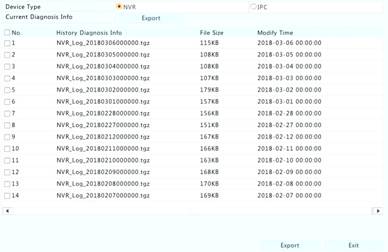
2. Select a device type:
?IPC: For IPC, history diagnosis info is generated at 00:05 every day. Select channels and then click Export at the bottom. To export current diagnosis info, click Export right to Current Diagnosis Info.
Note: For IPC, diagnosis info is recorded based on channel, which means, if an IPC is added to multiple channels, all the channels will record diagnosis info for the IPC.
TAGS:
Diagnosis information, logs, system configurations, system maintenance, collect image debugging info, troubleshooting, history diagnosis info, current diagnosis info


