









Hello, your privacy is important to us. Uniview websites use cookies to store info on your device and create the most secure and effective website . By continuing to use our websites, please accept the cookies could be stored on your device, which outlined our cookie policy and privacy policy .








 X
X
 GLOBAL / ENGLISH
Answer:
Note: There are two options available: SNMPv3 (default) and SNMPv2. SNMPv3 is recommended when a camera needs to transfer configuration with the central server. Both the camera and the central server should support SNMPv3.
Note: If you choose SNMPv2, an onscreen message will remind you of potential risks and ask if you want to continue.
1. Click Setup > Network > SNMP.
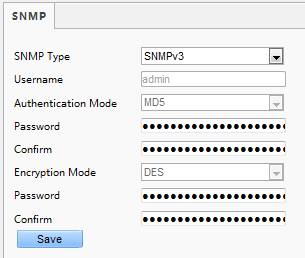
2. Select SNMPv3 and complete settings.
3. Click Save.
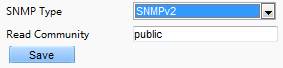
On the SNMPv2 setting page, Read-Only Community Name is used for two-way authentication between a camera and the central server. The default name is public, and you may change it as needed. If you change the Read-Only Community Name, you should change it into the same one on the central server, or the two-way authentication will not be completed.
TAGS:
SNMPv2, SNMPv3, central server, network setting, network setup, read communication


