








Hello, your privacy is important to us. Uniview websites use cookies to store info on your device and create the most secure and effective website . By continuing to use our websites, please accept the cookies could be stored on your device, which outlined our cookie policy and privacy policy .








 X
X
 GLOBAL / ENGLISH
Answer:
Set wiper parameters before you can control the wiper.
Note: Note: Only some certain models support this function. Please see the actual model for details.
1. Click Setup > System > Ports & Devices, and then click the External Device tab.
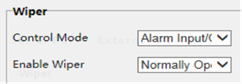
2. Set control mode for the wiper. The following table describes some major parameters.
| Parameter | Description |
|---|---|
| Serial Port | The wiper is controlled by PELCO-D instructions; therefore, the PTZ protocol should be set to PELCO-D. See PTZ control for details. |
| Alarm Input/Output | Use alarm input and output to open or close the circuit and control the wiper. |


